

How to use the customer update endpoints
Pennylane models customers in two types:
- Individual customers - natural persons identified by first and last name
- Company customers - legal entities identified by name, VAT number, and registration number.
The Company API v2 exposes a dedicated update endpoint for each type. Each endpoint must be called with an ID belonging to the matching customer type.
The two update endpoints
| Endpoint | Customer type | Type-exclusive request fields |
|---|---|---|
PUT /api/external/v2/individual_customers/{id} | Individual | first_name, last_name |
PUT /api/external/v2/company_customers/{id} | Company | name, vat_number, reg_no |
What happens when the wrong endpoint is used
Calling PUT /api/external/v2/individual_customers/:id with a company customer's ID does not return an error. The request succeeds, but it could write individual-specific fields first_name, last_name) onto a record that should never have them.
⚠️ So using the endpoints incorrectly could result in data corruption.
With the following concrete downstream impacts:
| Area | Impact |
|---|---|
| Management UI - Sales > Customers ( /companies/:company_id/thirdparties/customers) |
|
Accounting UI - Client Folder > Customerscompanies/:company_id/thirdparties) |
|
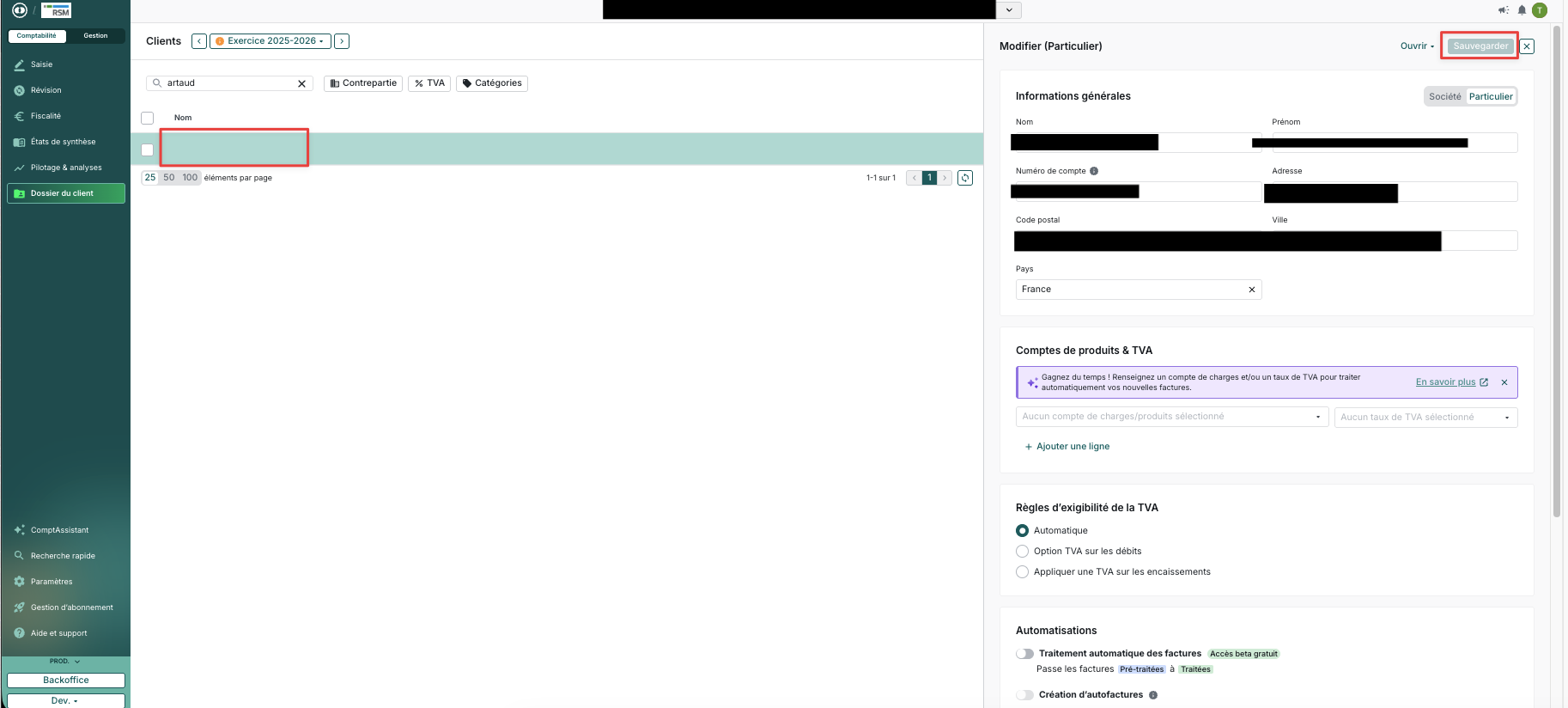
Resolution & Data Repair
- Self-Service Repair: navigate to
/companies/:companyid/thirdparties/customers?id=:customer_idon the Management side to manually re-enter and fix the corrupted attributes. - Support Escalation: If you are unsure which specific fields were overwritten or lost during corruption, contact Technical Support.
How to discover a customer's type
The dedicated individual_customers and company_customers endpoints do not return a
customer_type field in their responses. Use the list customers endpoint instead:
GET /api/external/v2/customers/{id}
The response includes "customer_type": "individual" or "customer_type": "company". Use
this to determine which update endpoint to call.
To fetch all customers of a specific type, use the list endpoint with a filter:
- `
GET /api/external/v2/customers?filter=[{"field":"customer_type","operator":"eq","value":"company"}]`
Valid customer_type filter operators: eq, not_eq.
Best Practices
-
Audit your integration for every call to
PUT /individual_customers/{id}and
PUT /company_customers/{id}. -
Check each customer's type by fetching
GET /api/external/v2/customers/{id}and
reading thecustomer_typefield ("company"or"individual"). -
Route updates to the matching endpoint:
customer_type: "individual"→PUT /api/external/v2/individual_customers/{id}customer_type: "company"→PUT /api/external/v2/company_customers/{id}
-
Migrate in bulk if needed: use the list endpoint with a
customer_typefilter to paginate over all customers of each type and update your local records:GET /api/external/v2/customers?filter=[{"field":"customer_type","operator":"eq","value":"company"}]
Example payloads
Updating an individual customer
Request
curl -X PUT https://app.pennylane.com/api/external/v2/individual_customers/42 \
  -H "Authorization: Bearer <token>" \
  -H "Content-Type: application/json" \
  -d '{
    "first_name": "Jane",
    "last_name": "Doe",
    "phone": "+33612345678",
    "emails": ["[email protected]"],
    "billing_address": {
      "address": "8 rue de la paix",
      "postal_code": "75002",
      "city": "Paris",
      "country_alpha2": "FR"
    },
    "payment_conditions": "30_days",
    "notes": "VIP customer"
  }'
Response 200 OK
{
  "id": 42,
  "name": "Jane Doe",
  "first_name": "Jane",
  "last_name": "Doe",
  "phone": "+33612345678",
  "emails": ["[email protected]"],
  "billing_iban": null,
  "payment_conditions": "30_days",
  "recipient": "Jane Doe",
  "reference": null,
  "notes": "VIP customer",
  "billing_address": {
    "address": "8 rue de la paix",
    "postal_code": "75002",
    "city": "Paris",
    "country_alpha2": "FR"
  },
  "delivery_address": {
    "address": "8 rue de la paix",
    "postal_code": "75002",
    "city": "Paris",
    "country_alpha2": "FR"
  },
  "ledger_account": { "id": 1001 },
  "external_reference": "0e67fc3c-c632-4feb-ad34-e18ed5fbf66a",
  "billing_language": "fr",
  "mandates": { "url": "https://app.pennylane.com/api/external/v2/gocardless_mandates?filter=..." },
  "pro_account_mandates": { "url": "https://app.pennylane.com/api/external/v2/pro_account/mandates?filter=..." },
  "contacts": { "url": "https://app.pennylane.com/api/external/v2/customers/42/contacts" },
  "created_at": "2023-08-30T10:08:08.146343Z",
  "updated_at": "2026-07-31T09:00:00.000000Z"
}
Updating a company customer
Request
curl -X PUT https://app.pennylane.com/api/external/v2/company_customers/7 \
  -H "Authorization: Bearer <token>" \
  -H "Content-Type: application/json" \
  -d '{
    "name": "Acme Corp",
    "vat_number": "FR12345678901",
    "reg_no": "123456789",
    "phone": "+33140123456",
    "emails": ["[email protected]"],
    "billing_address": {
      "address": "10 avenue des Champs-Élysées",
      "postal_code": "75008",
      "city": "Paris",
      "country_alpha2": "FR"
    },
    "recipient": "Jane Doe",
    "payment_conditions": "60_days"
  }'
Response 200 OK
{
  "id": 7,
  "name": "Acme Corp",
  "vat_number": "FR12345678901",
  "reg_no": "123456789",
  "phone": "+33140123456",
  "emails": ["[email protected]"],
  "billing_iban": null,
  "payment_conditions": "60_days",
  "recipient": "Jane Doe",
  "reference": null,
  "notes": null,
  "billing_address": {
    "address": "10 avenue des Champs-Élysées",
    "postal_code": "75008",
    "city": "Paris",
    "country_alpha2": "FR"
  },
  "delivery_address": {
    "address": "10 avenue des Champs-Élysées",
    "postal_code": "75008",
    "city": "Paris",
    "country_alpha2": "FR"
  },
  "ledger_account": { "id": 1002 },
  "external_reference": "1a2b3c4d-5678-90ab-cdef-1234567890ab",
  "billing_language": "fr",
  "mandates": { "url": "https://app.pennylane.com/api/external/v2/gocardless_mandates?filter=..." },
  "pro_account_mandates": { "url": "https://app.pennylane.com/api/external/v2/pro_account/mandates?filter=..." },
  "contacts": { "url": "https://app.pennylane.com/api/external/v2/customers/7/contacts" },
  "created_at": "2023-08-30T10:08:08.146343Z",
  "updated_at": "2026-07-31T09:00:00.000000Z"
}
Updated 3 months ago